Posts

Showing posts with the label coonley

Back to School Tweets

Image
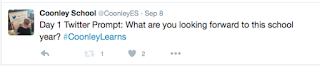
In Chicago we start school with our students the week of Labor Day so our first week is always 4 days long. To build excitement for the new school year each day I release a different Twitter prompt for our students and teachers to respond to. Past examples include: what are three things you love about Coonley? What are you looking forward to learning this year? What does your teacher need to know in order for you to be successful this year? What is one thing you learned this summer? For our teachers that already use Twitter they respond directly to the prompt and tag us. Those that don’t use the platform still contribute! Many will give students post it notes, use their whiteboards, index cards, etc. to respond to the prompt. The teachers will then snap a picture and send it to me to post for them. This not only allows our parents a sneak peak into our classrooms but also our teachers some talking points about responses they receive. Each year more teachers join Twitter to be ...

Google Tips & Tricks for Workflow

http://bit.ly/2rK6lnO Originally designed for Coonley School. Access the Document directly here:  https://docs.google.com/document/d/1c7VSI3Mk_DzwSECV9aNlIUBQDxLFKZN6D9XndujYIgI/edit?usp=sharing This document was featured on The Suite Talk: https://www.youtube.com/watch?v=3Zw1l-FQ2q4&feature=youtu.be

Hyperdocs

A presentation created for Home Grown PD for Coonley faculty.

Hour of Code 2017

Image
Direct Link to Document: https://docs.google.com/document/d/1Oc-5aawK4sFk2EXSDMNvWnIL4IgGhvKIn-zYbjg814Y/edit?usp=sharing

Home Grown PD Presentation: IETC 2017

Internet Safety in K-6

Digital Safety Digital Citizenship Week takes place in October. Although every teacher in every grade in every subject should be weaving in conversations about responsible online practices this is nevertheless a good time to teach some specific lessons on the topic.  Following are the resources I'm exposing K-6 learners to when they visit the computer lab this month. Kindergarten-2nd Grade Common Sense Media has a fantastic scope and sequence of lessons that have already been created to use with students. To make the lessons a bit more engaging for our little learners I have created presentations around two of the concepts featured in the scope and sequence, embedded and linked below.  I've also created review Kahoots for 1st and 2nd grade that are free to duplicate. Direct Link:  https://docs.google.com/presentation/d/1_lUc3CzlYXpozgLyoRVX-Kk0Gse5-wOS9CaxQLO5ElE/edit?usp=sharing Direct Link: https://docs.google.com/presentation/d/12GC8bjh3Trdau7xkI66orS...

U.S. Regions, Thinglink & Websites

L ast year our 3rd grade gifted teacher was looking for a way to use technology in his social studies curriculum. His project on researching regions of the United States lent itself to the multimedia program Thinglink . First students would research and gather information on the geography, economy and history of each region being studied. They would then use this information to display on their Thinglinks.    We created a graphic organizer as a way to help students organize their thoughts and research. Third graders still need guidance in taking notes so we created a more detailed graphic organizer this year which allowed them to enter their notes directly onto it.  By doing so we helped with the structure of the paragraphs they would be asked to complete.      After research and Thinglinks were complete students were asked to create a 5 page website: home page, credits, Thinglink, regions and dream vacation. Again, we constructed a graphic or...

The Power of the # Sign

A presentation I developed for my faculty to teach about using hashtags in Twitter.

Home Grown PD: Don't Wait for your District

Image
In schools today budgets are tight.  Professional development dollars are shrinking.  In my case, our district just instituted four furlough days; all of them faculty professional development days. Luckily we like to plan ahead. In the beginning of the school year we voted to divide one of our "Flex" PD days into several smaller sessions. This means we took one of the 3 professional development days front-loaded in the beginning of the school year and agreed to make up the hours over the course of the school year. This works for our faculty. After all, in the beginning of the school year teachers are focused on setting up curriculum and classrooms. Dispersing one of these days allows us to target topics or issues that might arise after the school year begins. When we began talking about what type of PD we needed it was different across the board- different grade levels and departments had different needs.  Our solution was to develop our own PD Learning Series whe...

Hour of Code Guide 2016

  Coonley Hour of Code Lesson Plan 2016 by Nicole M Zumpano on Scribd

Active Learning (and Tweeting!), Elementary Style

In November 2016 my colleague Sam Carpenter and I presented at the Illinois Education Technology Conference on Active Learning and Tweeting in an elementary school.  Below is our presentation.

BreakoutEDU, Kindergarten Style!

Image
This fall several of our teachers participated in The Global Read Aloud , working with classrooms across the United States to read the same books and share our thoughts and ideas about them.  One such partnership was with Ms. Cain, a librarian in North Dakota who is working with one of our kindergarten teachers, Ms. Thomsen .  Our collaboration takes places mainly through Seesaw where we share pictures and thoughts on the books we have read during this project. Ms. Cain suggested doing a BreakoutEDU activity that was created specifically around our Global Read Aloud author study. BreakoutEDU with kindergarten?!  I had only done this with adults (and Ms. Thomsen had never even heard about it)!  Luckily, I had recently purchased a kit which made this the perfect opportunity to dive right in with students. While the instructions for We Are Readers  were well done and thorough I still modified some to make the activity run smoother for our little learners. ...

Coonley Tech News, Volume 3

Old Topic, New Tool: Nearpod & Plagiarism

Image
Last year prior to science fair one of our middle school science teachers asked me to come in and speak to the classes about plagiarism. We had a great talk and the students were engaged with the Prezi and study guide ( see the original post here ).  This year, another teacher asked me to come in and  do a refresher.  Being that I was going to be addressing the same topic with the same kids and the same content I thought it might be time to try out a new tool (even coaches are still learning how to use new tools!).  My tool of choice was Nearpod . Near-what? Nearpod allows for interactive presentations that are sent directly to student devices; instead of students watching you in front of the classroom in front of a screen this is the one time you won't have to yell at your students for looking at their Chromebooks/iPads/laptops instead of at you! This also gave me the ability to control the presentation from my iPad while walking around weaving in and out of stu...

What's Your Goal?

Image
Each year as students head back to school they set goals for themselves; ' get good grades' , ' listen to the teacher' , ' become better at sports' are some popular ones we here.  Teachers in first grade, second grade and third grade took these goals a step further; they had students record them. Teachers began by having students write three goals for the new year.  When this step was complete I came in. Using the app Audioboom I recorded each student reading their goals.  Audioboom stores the audio recording on their site, and generously creates a QR code linking to it.  I printed each and teachers found creative ways to display them (see pics below).  These goals were then placed in classrooms for Open House.  Our parents loved them, and the students got a kick out of them as well. The hope is that we will come back to this activity in June and rerecord reflection statements about meeting/not meeting our goals.  It will be fun to compare writing ...

6 Word Memoirs, 2016 Edition

I'm not sure how I failed to post this sooner!  Last year Coonley classrooms contributed to our 6 Word Memoirs slideshow where each student created a memoir on their own slide.  Here's their masterpiece! Direct link:  https://docs.google.com/presentation/d/1tGs0NNGWnfbUAPIn2zOzkvyD2S4ExzYfYfBt8cvoz-4/edit?usp=sharing Last year's can be found here:  http://zumpanotechlab.blogspot.com/2015/06/one-year-told-in-six-words.html

5 Tips (and a Bonus!) to Start Tweeting with Your Students

Image
Have you thought about tweeting with your students but didn't know how to get started?  The end of the school year is a great time to pilot something new!  Below are 5 tips that the fabulous teachers at Coonley Elementary ( @CoonleyES ) have implemented (along with a bonus tip!). Start on Paper The first week of school I begin with a Twitter Prompt-a-Day to get the school community  excited for the upcoming year. While my goal is to someday see all of our teachers with a Twitter account we aren't quite there yet.  Photos by  @CoonleyLibrary  Not wanting to leave anyone out, I ask the teachers to tweet on paper and then I tweet it from the school account.  Additionally, you can have students create "tweets" via sentence strips to practice offline.  Have little learners?  How about creating a graphic organizer that only has 140 boxes (this is the character limit on Twitter) for students to practice tweets on (and sneak in a bit of s...

3rd Quarter Technology Highlights

Is this for Real? Evaluating Websites

Recently a 5th grade teacher came to see me about a research project.  As we talked through the details we had a discussion about evaluating websites.  As a result of this conversation I created a presentation for her students on evaluating websites. Here is the presentation along with some additional resources. Learn More Dig Deeper (older students) http://www.lib.berkeley.edu/TeachingLib/Guides/Internet/Evaluate.html Great Infographic http://www.whoishostingthis.com/resources/evaluating-web-resources/ Seven Steps to Website Evaluation https://21centuryedtech.wordpress.com/2013/06/11/step-a-seven-steps-to-website-evaluation-for-students-promoting-digital-citizens/ Question Media Wiki https://questionit.wikispaces.com Poster http://www.radcab.com Great 1 page examples from Easybib http://media.easybib.com/ebook/mla_websiteeval.pdf https://docs.google.com/presentation/d/1iX_FWlyuIIQxDmueswljWjCxz94R1B4-gdr8klf312A/edit#slide=id.p20 (same ex...

2nd Quarter Technology Highlights